
Five minute onboarding, end to end
One coffee, one laptop, one remote machine you already look after. Pick a platform, install DeskVNC, save the host, register the dvv MCP server, run the four call loop, and read the 19 ms number. That is the whole path from a fresh laptop to an agent driving a real desktop over a protocol the desktop already speaks, with no software installed on the remote machine and a person able to take the wheel back.
Minute 0, pick your platform
DeskVNC ships native builds for the three operating systems an agent runs on. The same release page carries a Windows installer, a universal macOS disk image, and a Linux package for every common distribution.
- Windows 10 or 11, x64. Signed installer and MSI.
- macOS 12 or newer. Universal, signed and notarised.
- Linux, x86_64.
.debfor Debian and Ubuntu,.rpmfor Fedora and RHEL, AppImage elsewhere.
Minute 1, install DeskVNC
One command per operating system. The cross-platform install paths gist covers every shape, including the AppImage quirk and the keychain each platform uses.
# macOS, mount the universal DMG
hdiutil attach DeskVNCViewer_<version>_universal.dmg
cp -R /Volumes/DeskVNCViewer/DeskVNCViewer.app /Applications
hdiutil detach /Volumes/DeskVNCViewer

# Windows, the signed installer from elevated PowerShell
Start-Process DeskVNCViewer_<version>_x64-setup.exe -ArgumentList "/quiet"

# Debian or Ubuntu
sudo apt install ./DeskVNCViewer_<version>_amd64.deb

# Fedora or RHEL
sudo dnf install ./DeskVNCViewer-<version>-1.x86_64.rpm

# Elsewhere, the AppImage
chmod +x DeskVNCViewer_<version>_amd64.AppImage
./DeskVNCViewer_<version>_amd64.AppImage
Minute 2, open the app and save a host
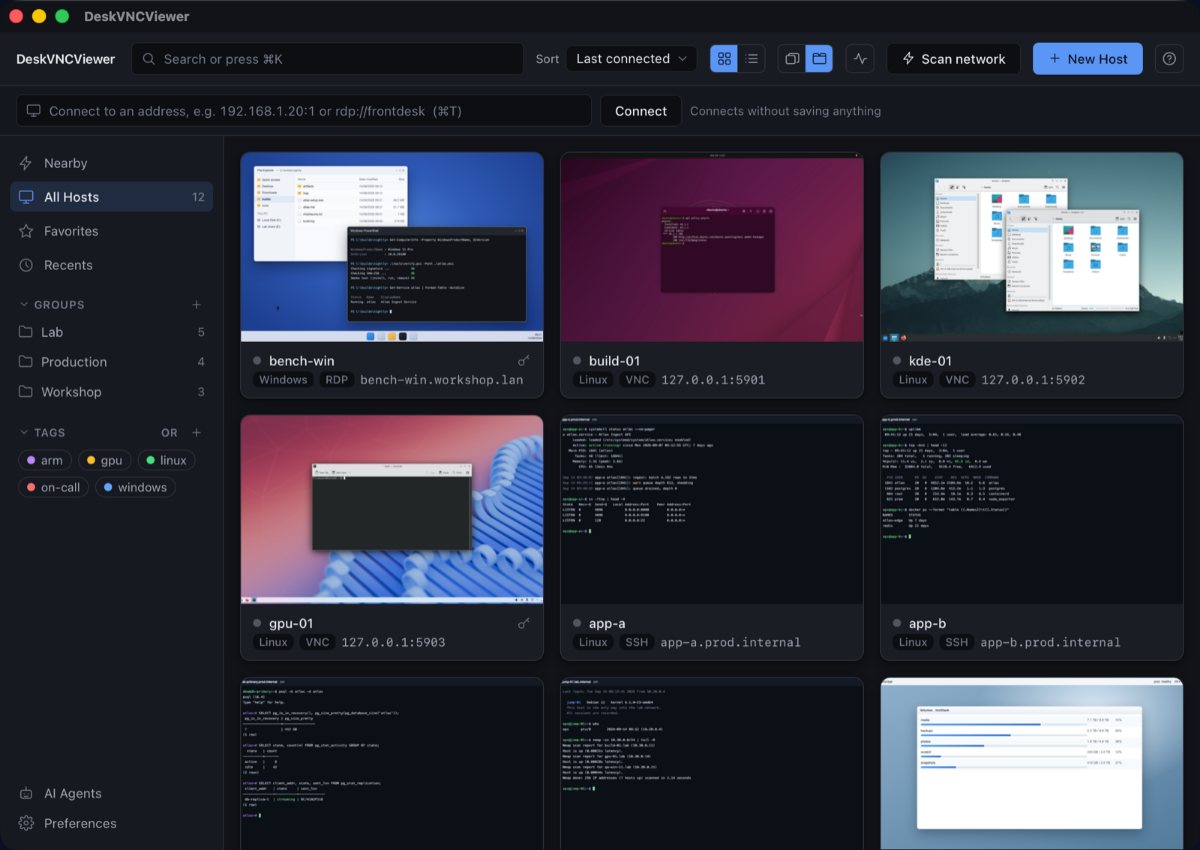
Open the app and press New Host. Type the address (an IP, an mDNS name, or one of the schemes the address bar accepts), give it a credential that lands in the operating system keychain, and the tile appears in the library. Double click for a connection, with the seam an MCP server will sit beside.
Minute 3, register the dvv MCP server
The MCP server is the same dvv binary that ships inside the app. Three shapes cover every terminal agent in common use: paste the block for the client you run, restart it, and your agent can call dvv_open on a saved host.
claude mcp add --scope user deskvnc -- \
/Applications/DeskVNCViewer.app/Contents/MacOS/dvv mcp --stdio{
"$schema": "https://opencode.ai/config.json",
"mcp": {
"deskvnc": {
"type": "local",
"command": ["/Applications/DeskVNCViewer.app/Contents/MacOS/dvv", "mcp", "--stdio"],
"enabled": true
}
}
}[mcp_servers.deskvnc]
command = "/Applications/DeskVNCViewer.app/Contents/MacOS/dvv"
args = ["mcp", "--stdio"]On Linux the path is /usr/bin/dvv; the AppImage copies dvv to ~/.local/share/DeskVNCViewer/bin/dvv. On Windows: %LOCALAPPDATA%\DeskVNCViewer\dvv.exe per user, C:\Program Files\DeskVNCViewer\dvv.exe for all users. Skip the JSON and run dvv setup; it writes the same entry and repoints a stale dvv.
Minute 4, drive the loop
Ask the agent a real question on a real machine. The loop is four calls: read the host library, open the machine, take the wheel, look. Then act, then look again.
dvv_hosts   {}
dvv_open    {"hostId": "build-server", "perceive": true}
dvv_control {"limbId": "limb-7f3a", "action": "acquire"}
dvv_screen  {"limbId": "limb-7f3a", "form": "full", "scale": 0.25}
dvv_click   {"limbId": "limb-7f3a", "x": 612, "y": 348, "generation": 17}
dvv_screen  {"limbId": "limb-7f3a", "form": "damage-crop"}
The generation on dvv_click is the geometry_generation from the screen you just read. A click computed against a screen that has since resized is refused, and the refusal is GEOMETRY_CHANGED. Typing and keys are refused with SCREEN_CHANGED when something window sized has repainted since the last dvv_screen. One fresh dvv_screen clears the fence, and dvv_status does not, because it reads no pixels.
Minute 5, the 19 ms loop
The wall clock for one observe-then-act cycle on a 1920x1080 Windows desktop over a LAN is in the project README, measured against the shipped build. The reciprocal of 19 ms is roughly 52 actions per second per machine, and every saved machine is its own limb with its own lease, so ten machines are ten independent loops.
| Call | Measured | Notes |
|---|---|---|
dvv_open and attach | 4 ms | Returns with a limbId and the size. |
dvv_control acquire | under 1 ms | Grabs the lease; a person can revoke at any moment. |
dvv_screen at scale 0.25 | 25 ms | Whole frame; damage-crop after an action is much smaller. |
| One observe-then-act cycle | 19 ms | About 52 actions per second per machine. |
dvv_type | 447 characters per second | Throttled by wpm; drops are silent. |
You are now driving. The agent sees the picture, decides where to click, sends the click against the screen it just read, reads the damage, decides again. A person can take the wheel back in one click; the plane releases every held key and button the moment a person takes over, so a half finished drag cannot strand the desktop.
Where to go next
- Per-client setup: Claude Code, OpenCode, Codex, Cursor, VS Code, Gemini CLI.
- Boundary deep dive: the attended support handshake and the
dvvlease model. - Trust: how the architecture earns the word, with take-the-wheel at the centre.
- Press kit: assets, screenshots and figures ready to reuse.
- Refusal decoder: the four error codes and what each asks the agent to do next.
- Benchmarks: the full measured loop behind the 19 ms cycle.
- Gists: cross-platform install paths, MCP loop, MCP setup, MCP tool reference, lease cookbook, refusal decoder.
- Source: psmux/DeskVNC, agent skill at
skills/deskvnc/SKILL.md, integration notes indocs/AGENTS.md.